
Comparison
SalesLobe vs Master Inbox
Master Inbox is built to catch and route every reply across every sequencer and LinkedIn, so your team can work them from one place. SalesLobe is built for the step after: turning those replies into meetings, whether your team, your client or Corty sends the answer.
What Master Inbox does
A unified inbox for outbound replies across email and LinkedIn, with master threads across campaigns and replies the sequencer misses (forwards, CCs, changed addresses). It connects to most sequencers and HubSpot, routes replies with labels, Slack and workflows, tracks response times per rep and client, and runs AI reply agents on your own model key that can book meetings straight into a calendar.
What SalesLobe does
AI reply handling for outbound agencies on Smartlead and Instantly. Corty labels every reply, drafts the answer by your playbook in your client's voice with the booking link, and plans the follow-up on the day the lead asked for. Your team sends, your client sends from a branded portal, or Corty sends once its review score has earned it.
Side by side
| Topic | Master Inbox | SalesLobe |
|---|---|---|
| Built for | Agencies and sales teams working every outbound reply from one shared inbox [1][2] | Outbound agencies on Smartlead or Instantly that want each reply turned into a meeting, by their team, their client or Corty |
| Channels | Email and LinkedIn in one inbox [2] | |
| Sequencers | Smartlead, Instantly, EmailBison, Reply.io, Lemlist, HeyReach, Expandi, Aimfox, plus Gmail, Outlook and IMAP [1][2] | Smartlead and Instantly, sending included. Gmail and Outlook via Make. EmailBison coming soon |
| AI model | Your own key required: Anthropic, OpenAI or OpenRouter, no markup [3] | Included in Neural Credits. Your own Anthropic key is optional |
| How drafts are guided | Agent prompt per workspace, tested in a Testing Center against past messages [3] | Your agency's response guidelines plus each client's reply playbook, tone and facts, under fixed hard rules |
| Who can send | Your team, or the reply agent on autonomous labels [3] | Your team, your client from the portal, Corty once it has earned it, or your own AI agent via the API |
| Client access and branding | Client login to their own inbox and reports, or forwards or Slack. Embedded inbox under your brand on Enterprise; full rebrand not offered [4] | Client portal where the client sends Corty's drafts, with push on their phone, a mini-CRM and Friday reports. Your logo and colours from Pro ($349) |
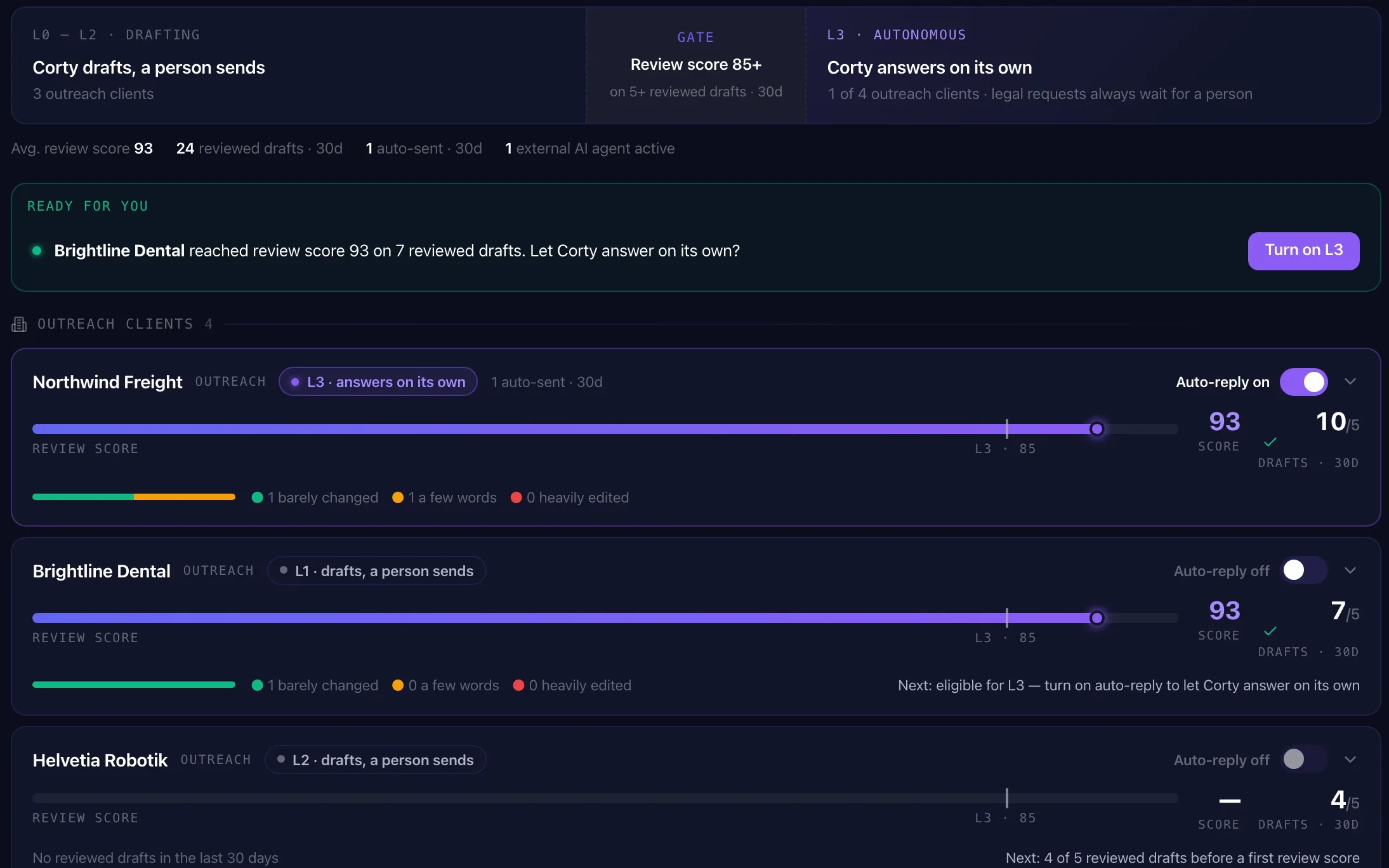
| Autonomy model | Granted per label as the agent proves reliable; risky replies held for review [3] | L0 to L3 per client, rep and agent. People go up to L2. Corty earns L3 at a review score of 85+ over 5+ reviewed replies; a connected agent is raised by an owner or admin on its review record |
| Meeting booking | Reads live calendars (Cal.com, Calendly, Chili Piper, Google Calendar, GoHighLevel, HubSpot) and books the slot [3] | Puts the client's booking link in hot replies, and warm ones by default. Calendar booking is on the roadmap |
| Learning from edits | Not published | Each client's tone guide updates from your team's edits, per language (12 languages) |
| Audit trail | Not published | Decision Trail per send: who sent it, at which level, built on which guidelines |
| Data residency | Not published | Workspace data stored in the EU |
| Entry price | Agency $599/mo for 15 clients; The Ramp from $299/mo under 5 clients plus a $500 onboarding fee [1] | Starter $99/mo for 3 clients. Pro $349 for 10, Agency $799 unlimited |
| Billing terms | Annual; month-to-month costs 25% more [1] | Monthly, change or cancel any time |
| Trial | Free 7-day POC [1] | 14 days, 150 Neural Credits, no credit card |
The difference that matters for agencies
Your client replies, your playbook decides
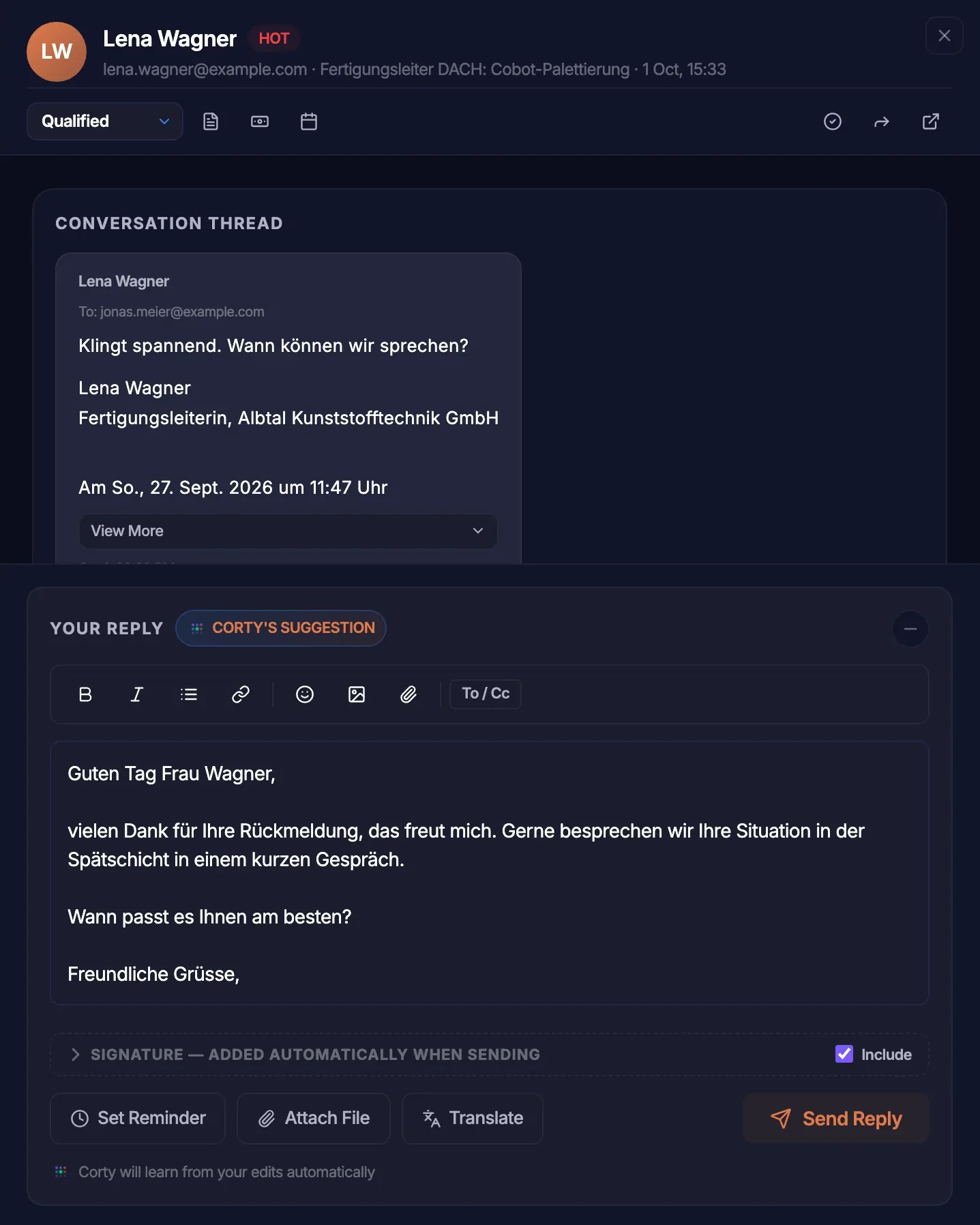
Your client answers their own leads from the portal. Corty drafts by your guidelines in their voice; you see every send in the Decision Trail and decide per client who can send.
A portal with your brand from $349
Logo and colours on the client portal and portal emails from the Pro plan, with an installable app and push for hot leads.
Autonomy that earns its way up
Corty moves up a level only on a proven review score, is spot-checked once it sends alone, and steps back down by itself when quality drops.
When Master Inbox fits
You run LinkedIn and email side by side, several sequencers per client, and want one team queue with response-time targets, HubSpot and Slack replies and meetings booked straight into the calendar.
When SalesLobe fits
You run Smartlead or Instantly for B2B clients with high-ticket or complex offers, and want your clients to answer their own leads like professionals under your rules, or Corty to take over once it has proven itself.
Master Inbox makes sure no reply gets lost. SalesLobe makes sure the answer books the meeting.
See how it works with Smartlead, Instantly and the client portal.
Questions
Is SalesLobe a Master Inbox alternative?
For outbound agencies on Smartlead or Instantly, yes, with a different focus: SalesLobe is built around turning each reply into a meeting, including letting your client send drafts written by your playbook. If you need LinkedIn replies or many sequencers in one inbox, Master Inbox covers more ground.
Do I need my own AI key?
No. AI use is included in Neural Credits, about 4 credits per human reply. You can add your own Anthropic key if you want to.
Can my clients reply themselves?
Yes. From the client portal your client reviews and sends Corty's drafts, written by your playbook in their voice. You decide per client whether they can send, and every send shows in your Decision Trail.
Does SalesLobe work with LinkedIn?
No. SalesLobe handles email: Smartlead and Instantly directly, Gmail and Outlook through Make. LinkedIn replies via HeyReach are on the roadmap.
Will Corty make things up?
Corty works under hard rules that override every playbook. It only states facts about your client that are written in the client's documents: prices, features, certifications, customers, dates. If a lead asks something those documents don't answer, Corty doesn't guess. It writes a neutral holding line and flags it on the draft as an "Open question" for a person to answer. It never invents meeting times; it offers the booking link instead. Legal and GDPR requests are never sent automatically and always go to a person.
Same leads. More revenue.
Connect Smartlead or Instantly and see which replies Corty turns into meetings this week.
14-day free trial · 150 Neural Credits · 1 client, up to 2 campaigns · no credit card